Enjoy the epic Maui Mallard GB on Gameboy (GB) / Advance (GBA) console directly in your browser. This is an awesome video game you can play online, but you can’t download. Press Start Game to begin the journey.
Controls
← → ↑ ↓ = Directions
Z = A X = B
A = X S = Y
D = L C = R
enter ↵ = Start
shift = Select
Maui Mallard GB: Retro Game Summary
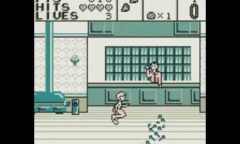
Maui Mallard in Cold Shadow for the Game Boy (GB) is a classic 8-bit retro platformer that brings the dual-identity adventure of Donald Duck to Nintendo’s iconic handheld. In this portable action-adventure game, players control detective Maui Mallard, who must transform into the stealthy Ninja Cold Shadow to retrieve the stolen Shabuhm Shabuhm idol and save a tropical island from destruction. The Game Boy port cleverly adapts the rich level design, fluid animations, and tight combat mechanics of the 16-bit original into a pocket-sized experience. Players must navigate treacherous environments, defeat unique enemies with a bug-shooting pistol, and master acrobatic staff-climbing maneuvers as the ninja. Featuring challenging retro platforming, memorable chiptune music, and impressive pixel art, Maui Mallard GB remains a must-play vintage title for enthusiasts of classic Disney games and 90s handheld side-scrollers.
Keyboard Controls Guide
| Game Boy Action | Keyboard Key |
|---|---|
| D-Pad (Move / Aim / Duck) | Arrow Keys (Up, Down, Left, Right) |
| Button A (Jump) | Z Key |
| Button B (Shoot / Staff Attack) | X Key |
| Select (Switch Identity) | Spacebar or Shift Key |
| Start (Pause Game) | Enter Key |